Multilingual Meeting Transcription for Global Teams
Real-world transcription accuracy trails vendor claims by nearly 40 percentage points.
Multilingual meeting transcription breaks under exactly the conditions global teams actually work in: a heavy accent, two languages in one sentence, a laptop mic on a bad wireless connection. Vendors advertise accuracy numbers pulled from a quiet room with one native English speaker, and most distributed teams never get near that room. Coverage and accuracy get sold as the same promise when they aren't: a tool that "supports" 90 languages is not the same tool as one that transcribes those 90 languages correctly, and buyers who conflate the two end up trusting documents they shouldn't. That distinction is the one worth holding onto through everything that follows, because it's also the one most procurement conversations skip.
What AI transcription is actually doing when it processes speech
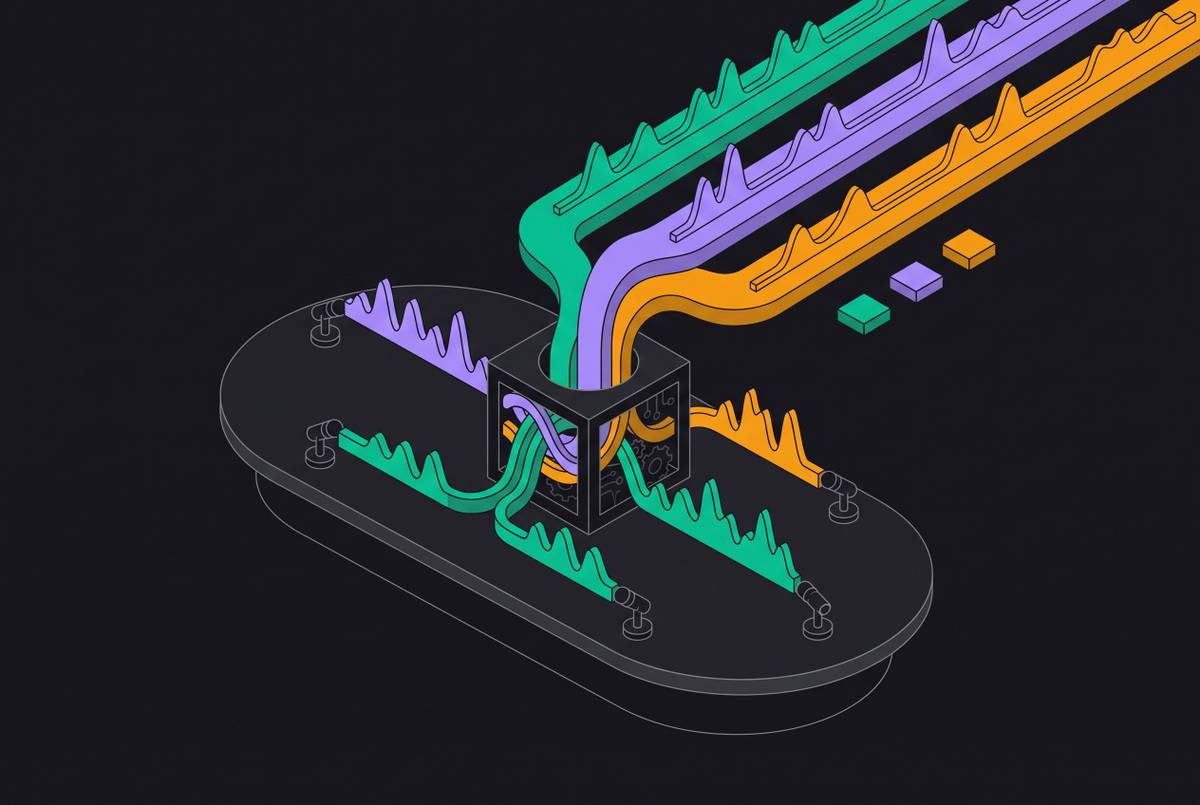
Every transcription tool runs on two layers stacked on top of each other. The first is automatic speech recognition, or ASR, which takes a raw audio waveform and turns it into word tokens. The second is a natural language processing layer that adds punctuation, structure, and enough sense of context to make the output readable instead of a wall of run-on text.
Sitting next to that pipeline is speaker diarization, the job of figuring out who said what. Diarization doesn't just transcribe words, it tracks turns in conversation and assigns them to individual speakers, and that matters once a call has four or five people talking over each other.
Language enters this pipeline as a hard constraint, not a setting you flip on. Each language needs its own acoustic model, trained on enough audio in that language to learn its phonemes, rhythms, and word boundaries. A model trained on a thinner pool of audio performs worse, no matter what the marketing page claims. Vendors let buyers assume coverage and accuracy are the same thing. They aren't, and treating them as interchangeable is the single most common mistake in this category.
Vocabulary compounds the problem. Technical jargon, brand names, and product names all strain an ASR model, and the strain gets worse outside English, where domain-specific training data runs thin to begin with. Some tools let teams feed in a custom glossary ahead of time, which cuts down on errors for that specific vocabulary. It helps. It doesn't fix the underlying model, and no glossary substitutes for a language having a real training corpus behind it.
OpenAI's Whisper was pretrained on 680,000 hours of supervised multilingual audio, the kind of volume that separates a genuinely capable multilingual model from one that claims multilingual support on a landing page and little else. Even a well-trained model still has to survive contact with a real meeting, though: background noise, two people talking at once, an air conditioner picking up on a laptop mic, audio compressed by a video call platform before it ever reaches the transcription engine. All of that degrades accuracy before language even becomes a factor.
The accuracy numbers vendors advertise and what they actually measure
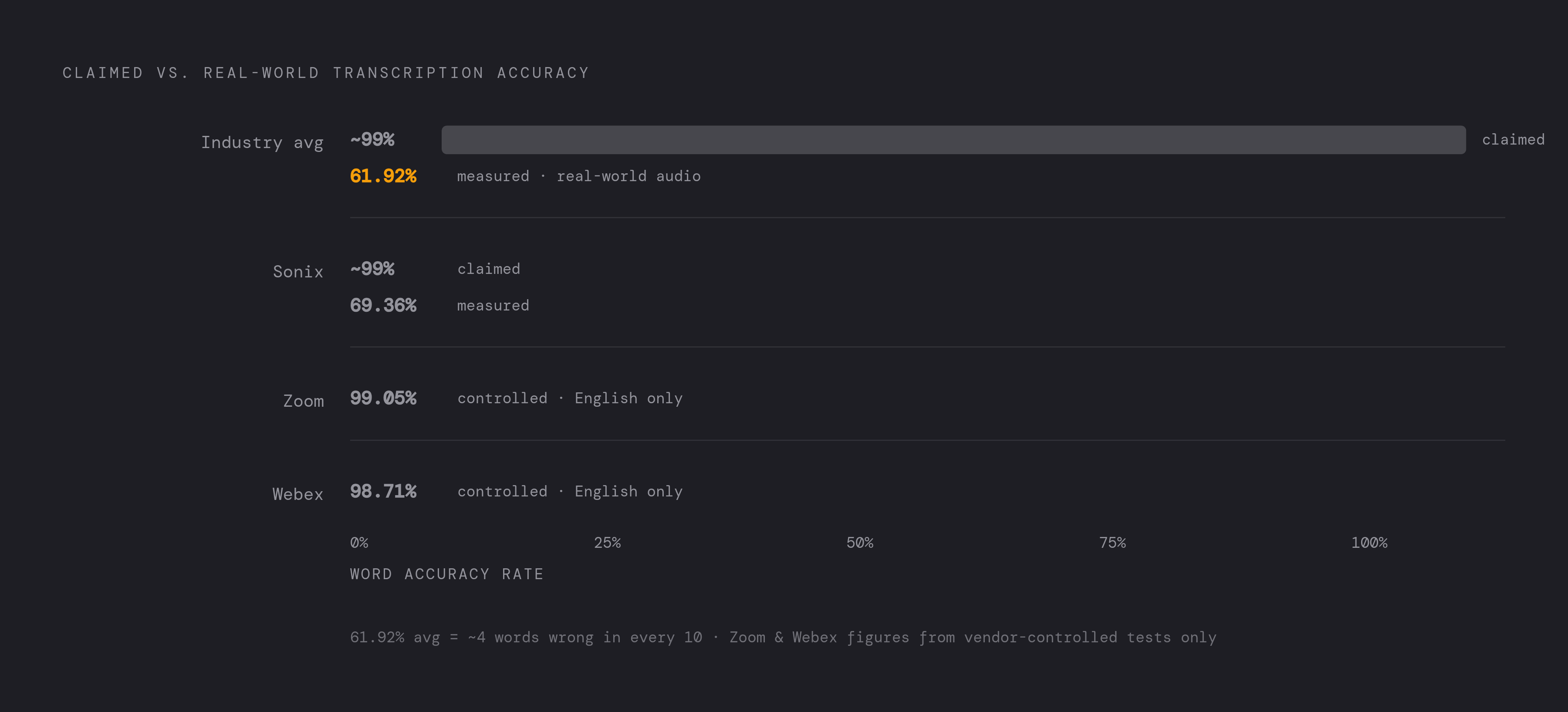
Vendors lead with a number in the high 90s. Sonix's own research on real-world business audio found the average transcription platform lands around 61.92% accuracy, nowhere close to the 99% figure that shows up in the optimal-condition demo. That gap is the whole story, and it's not a rounding error.
"Optimal conditions" is doing a lot of work in that sentence. It usually means one speaker, a clean microphone, no background noise, a standard accent, none of which describes a call with six people dialing in from four countries on three different headset qualities.
At 61.92%, close to four words in ten come out wrong. That isn't a rough transcript. That's a document that actively misleads whoever reads it later, and it's arguably worse than no transcript at all, because it still carries the appearance of a reliable record while quietly lying about what was said.
Integrated platforms fare better under controlled testing. Testing reported by azeusconvene.com put Zoom at 99.05% accuracy and Webex at 98.71%. Those numbers are real, but they're measured in English, under conditions the platform controls end to end, on its own infrastructure. They say almost nothing about how the same system handles a call where speakers are switching between languages mid-sentence, which is the actual test that matters for a global team.
So the question buyers need to ask isn't whether a tool supports a language. It's what its word error rate looks like in that language specifically, under real audio conditions, not a best-case demo number. Ask for accuracy broken out by language rather than pooled into one headline figure, and ask what conditions produced that number. If a vendor can't answer either question, treat the headline accuracy claim as marketing, not data, full stop.
How accent handling and language breadth differ across tools
Language support and accent support sit on different axes entirely. A tool can transcribe Spanish reasonably well and still fall apart on a Chilean or Dominican accent, because regional pronunciation, slang, and cadence shift the acoustic signal the model has to read.
Machine learning has closed some of that gap. Sonix's research points to accuracy gains of up to 30% over earlier model generations on diverse accents, which is real progress. Worth remembering, though: a 30% jump over a weak baseline can still land well below what a team actually needs, and vendors rarely volunteer what that baseline was.
Language breadth claims are all over the map, and wider is not automatically better. Some platforms advertise 40-plus languages, others push past 50. AssemblyAI's Universal model claims coverage around 99 languages. HappyScribe claims 90% word accuracy on real business meetings across more than 150 languages, with 94% accurate speaker diarization. Broader coverage usually means thinner training data spread across more languages, and any 99-language claim deserves that skepticism attached to it by default. A tool boasting that kind of breadth may have strong, well-tested accuracy for its top ten languages and something closer to marginal performance for the rest.
Dialect support compounds this further. Regional variation inside a single language, one variant against another, can matter as much as the gap between two entirely separate languages. None of this shows up on a features page. It shows up when a team runs its actual language pairs through the tool and checks the output line by line. That's the only test that answers the question, and skipping it is how teams end up with a transcript they can't trust six months in.
Code-switching, the multilingual problem most tools aren't built for
Code-switching means alternating between languages within one conversation, sometimes within one sentence. It isn't a rare linguistic quirk. It's how a large share of the world's multilingual speakers actually talk. A bilingual French-English speaker might finish an English sentence with a French clause; a sales call in one region might drift between Spanish and English depending on who's speaking or what topic just came up.
Most ASR systems aren't built for that. They expect one language per session, and when the audio doesn't cooperate, the model either throws errors, drops into silence, or, worse, produces confident-sounding output that isn't correct at all.
Whisper illustrates the failure well. Depending on configuration, Whisper alternates between a transcription task and a translation task. On a bilingual sales call, according to research from Gladia, this can produce a transcript that comes out entirely in English, with no marker anywhere that the original audio ever contained a second language. The system doesn't fail loudly. It fails quietly, and quiet failure is the more dangerous kind, because nothing about the transcript signals that anything went wrong.
Some newer approaches handle this better. AssemblyAI's Universal-Streaming model reportedly processes six languages, English, Spanish, French, German, Italian, and Portuguese, in real time, without a manual language switch mid-session. Automatic detection instead of manual per-session configuration is the actual design difference that matters here, and it's the line that should separate a tool worth trusting from one that isn't.
A transcript that silently drops or mistranslates one language in a bilingual meeting doesn't just leave a gap. It creates false confidence in a broken record. A team trusting a flawed transcript ends up worse off than a team that knows outright it has no transcript at all.
Real-time delivery versus post-meeting accuracy, why global teams face a tradeoff
Live captions need speed. Industry guidance puts the latency bar for real-time transcription and voice-agent response at under 300 milliseconds, a hard engineering ceiling, not a nice-to-have.
That speed requirement forces a real tradeoff, and any vendor claiming both maximum speed and maximum accuracy is cutting a corner somewhere and not telling you which one. Models capable of handling messy, multilingual, code-switching-heavy audio accurately tend to run too heavy for a 300-millisecond window. Lighter models built for real-time delivery trade away accuracy to hit that speed target. Deepgram's Nova-3, released in 2025, aims to close that gap, targeting sub-300ms latency across more than 50 languages, according to reporting from Sally.io.
Global teams feel this split in three separate moments. Live captions during the call favor speed over precision. The post-meeting transcript, generated after the fact with no time pressure, can afford a slower, more accurate pass. Async catch-up, someone reviewing the record hours or days later, depends entirely on that second, higher-quality version, not the live one.
Time zones make the stakes concrete. Someone in Singapore reading a transcript from a meeting held during US business hours has no way to ask a speaker to repeat themselves. The post-meeting record is the only version of events that person will ever get, which makes its accuracy the whole ballgame and not a nice bonus. Ask any vendor directly: does the tool run a separate, higher-accuracy pass after the meeting ends, and does that happen automatically, or does someone have to remember to trigger it?
What to look for when evaluating multilingual transcription tools
None of this reduces to a feature checklist. It reduces to a handful of pointed questions that separate real capability from a marketing page, and most buyers skip straight past them because the vendor never volunteers the answers.
Start with accuracy, not language count. Ask for word error rate broken out by specific language, not blended into one average, and test the tool against the actual language pairs and accents a team uses day to day, not the full list it claims to support.
Push on code-switching directly. Does the system handle a mid-conversation language shift without someone manually flipping a setting? And when it's uncertain which language it's hearing, does it flag that uncertainty, or does it silently default to one language and hope nobody notices?
Check diarization accuracy language by language, not as one blended average, since attribution errors get worse exactly when speakers switch between languages. Test with genuinely messy audio: a call recorded over compressed video, background chatter, an average laptop mic, not the clean studio sample the vendor hands over for the demo.
Look hard at where the output goes after transcription ends, too. Does it route into Salesforce, HubSpot, Slack, Asana, or Notion, and does that routing hold up for non-English content the same way it does for English? Many integrations just attach a transcript as an unstructured blob rather than mapping it into actual fields, which produces noise instead of something a team can act on.
Consider how the tool captures audio in the first place. Some join calls as a visible bot that announces its presence, others record silently from the desktop, and that difference carries real consent implications, especially in cross-border meetings where recording norms and disclosure rules vary by jurisdiction. Check compliance basics while you're at it: GDPR isn't optional for teams touching Europe, SOC 2 Type II matters for enterprise buyers, and data residency needs a straight answer when meetings span multiple countries.
How six tools currently handle multilingual meeting transcription
HappyScribe claims 90% word accuracy on real business meetings across more than 150 languages, with 94% accurate speaker diarization, according to the company. It joins Zoom, Microsoft Teams, and Google Meet, offers a mobile app for in-person recording, and provides an API along with an MCP connector. The product is built around multilingual teams specifically, with entity recognition surfacing people, companies, decisions, and commitments straight out of the transcript. It carries SOC 2 Type II and GDPR compliance.
Microsoft Teams with Copilot runs its ASR on Azure Cognitive Services, layering in semantic summarization, task extraction, and sentiment analysis on top. It's native to the Microsoft 365 environment, and its multilingual capability leans on Azure's broader language infrastructure rather than a purpose-built transcription model. This fits organizations already standardized on Microsoft 365, where meeting transcription and workflow tools already live under one roof, but it isn't the pick for a team that needs best-in-class accuracy on a specific non-English pair.
Sonix supports more than 54 languages, with automatic language detection and the ability to transcribe mixed-language content in a single pass. It advertises accuracy up to 99%, though independent testing, per Sonix's own published research, found it performing at 69.36% under real-world conditions. That's above the 61.92% average across platforms, but a meaningful step below the headline number, and buyers should treat that gap, not the marketing figure, as the honest baseline. It also ships AI analysis tools: custom prompts, automatic summaries, sentiment analysis, entity detection. It suits teams that need broad language coverage and are willing to verify accuracy on their own specific language pairs before betting on it.
Beyond these three, a broader category of AI meeting intelligence tools has grown up around workflow integration depth rather than transcription quality alone, some supporting well over 100 languages, connecting into CRMs and project tools, working across both virtual and in-person meetings. Pressure-test this category on three points: whether the tool records silently or joins visibly as a bot, whether it offers an API or MCP connector for custom integration work, and whether its accuracy actually holds on accented or non-English audio rather than only in the English-optimized demo that closes the sale. Coverage claims in this category should be read as a starting point for testing, not a conclusion.
What happens to multilingual meeting content after transcription ends
Most tools stop at the text file. What happens next, whether that transcript turns into organizational memory or just sits in a folder nobody opens again, is where the real value gets decided, and it's the step most vendors treat as an afterthought.
Sonix's research found close to 60% of workers struggle to retain what happened in a virtual meeting. For a global team, that retention problem compounds when the original record already has language gaps baked into it: two failures stack on top of each other instead of one.
Action items are the most perishable thing a meeting produces. A commitment made in a French-English call that never gets captured, assigned, and routed within a few hours is a commitment already at risk of quietly dying. Good post-meeting handling looks specific, not abstract: action items land in the assignee's task tool, Asana or Linear, regardless of what language they were spoken in. Summaries sync into CRM records, HubSpot, Salesforce, Attio, attached to the right contact or deal. Decisions surface in Slack or a team channel with enough context around them that someone catching up eight hours later, in a different time zone, doesn't have to guess what was actually agreed.
That's the real payoff of multilingual transcription done right. Not a cleaner document, but a record a distributed team can actually trust without having sat in the room.